

Public Complaints Management System (SISPAA)
The Role of SISPAA for Raub District Council (MDR)
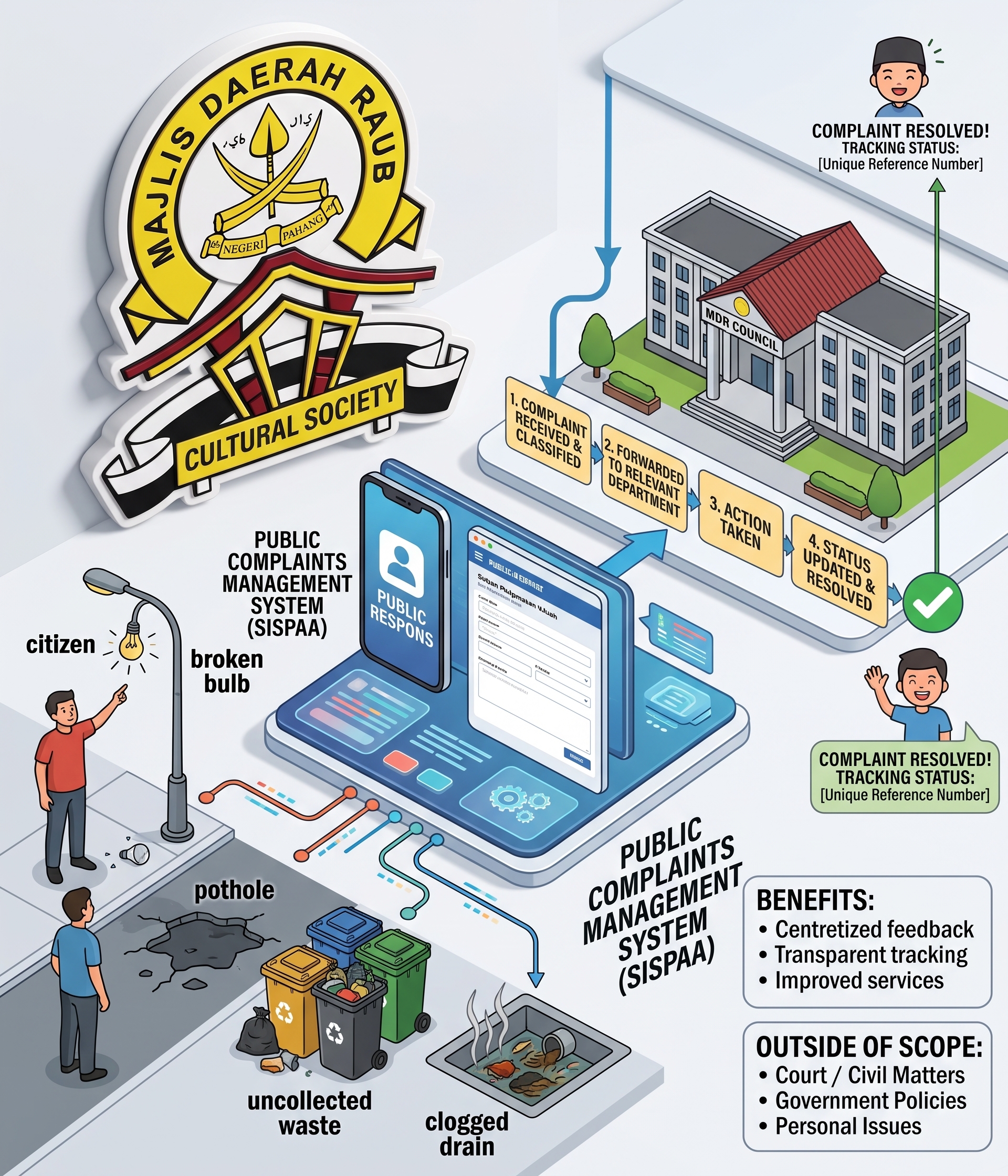
As a Local Authority (PBT) in Pahang, the Raub District Council (MDR) integrates a dedicated SISPAA portal (SISPAA MDR) to manage various community feedback.
- Submission of Municipal Service Complaints: Residents of the Raub district can report local issues directly to MDR.
- Damage to public amenities (streetlights, potholes, clogged drains).
- Sanitation issues, grass cutting, and solid waste management.
- Nuisance caused by stray animals, livestock, or pets.
- Business licensing issues, unauthorized structures, and enforcement matters.
- Centralized & Integrated Feedback Process: Complaints are handled directly by the MDR Complaints Officer and routed to the relevant department or unit.
- Real-Time Status Tracking: Complainants can track their reports using a unique reference number to monitor the status of actions taken by MDR.
What Can and Cannot Be Reported via SISPAA
| Eligible Categories | Outside Scope / Ineligible Categories |
| Delays or lack of action taken | Matters currently under court/civil proceedings |
| Poor service quality or unsatisfactory counter service | Fixed government policy decisions |
| Lack of or damaged public facilities | Personal or family disputes |
| Failure to enforce local authority bylaws | Personal or commercial claims |
Access & Complaint Channels for Raub District Council
- SISPAA MDR Portal: mdraub.spab.gov.my
- Mobile Application: Respons Rakyat app (available on Google Play Store & Apple App Store).
- Required Information: User registration/account, incident details/location, supporting photos (if any), and a description of the issue.
Step 1: Access the Portal & Log In
- Visit the official portal: mdraub.spab.gov.my
- Click Log In if you already have an account, or click Register New Account if you are a first-time user. (Tip: You can also submit complaints without registering, but creating an account makes it easier to track your complaint history in the future).
Step 2: Create a New Complaint
- After logging in, click on the New Complaint / Feedback Form button.
- Select Feedback Type: Choose Complaint (or Suggestion/Enquiry/Appreciation depending on your need).
Step 3: Fill In Complaint Details
- Complaint Title: Write a concise and clear title (e.g., Pothole Issue at Jalan Bukit Koman).
- Category: Select the most suitable sub-category (e.g., Sanitation, Infrastructure/Public Amenities, Enforcement).
- Complaint Description: Detail the issue clearly:
- What the issue is.
- Specific location (street name, nearby landmarks, or house/premise number).
- Date/time the issue was noticed.
Step 4: Upload Evidence (Highly Recommended)
- Click the Attachment / Choose File button.
- Upload photos of the site, damage, or supporting documents. (Photo attachments significantly speed up MDR officers' verification of the location and damage).
Step 5: Submit & Save Reference Number
- Review the details you provided.
- Click Submit.
- Save the Complaint Reference Number (e.g., MDR-XXXXX) displayed on the screen or sent to your email.
How to Check MDR Action Status:
- Revisit mdraub.spab.gov.my.
- Click on Check Complaint / Feedback Status.
- Enter your Reference Number and IC/ID Number to view the real-time status of actions taken by the MDR Complaint Officer.